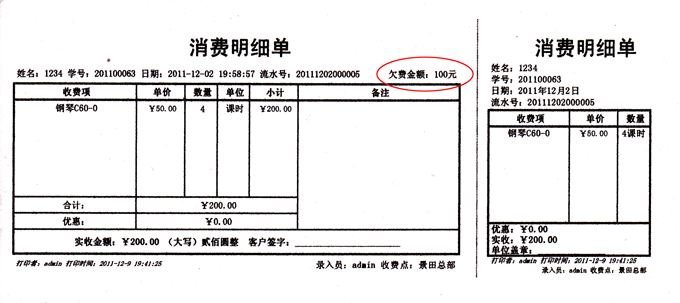
之前跟大家讲过,麦田培训学校管理软件,具有平台性,可以通过语法修改打印格式。今天就带大家了解一下,如何调用数据源增加个性化字段。在日常工作中,有些校长问,如何在麦田软件的收据凭证上显示欠费金额呢?麦田软件的收费模式其实是一种基于虚拟账户的模式,原理上相当于先充值后扣费,如果说消费单是体现扣费的过程,那么欠费显然不属于消费单显示的内容,欠费而是计对学员账户。在麦田软件中采用借款,还款方式来解释欠费事务。了解了这些我们就可以着手来分析实现方法了。
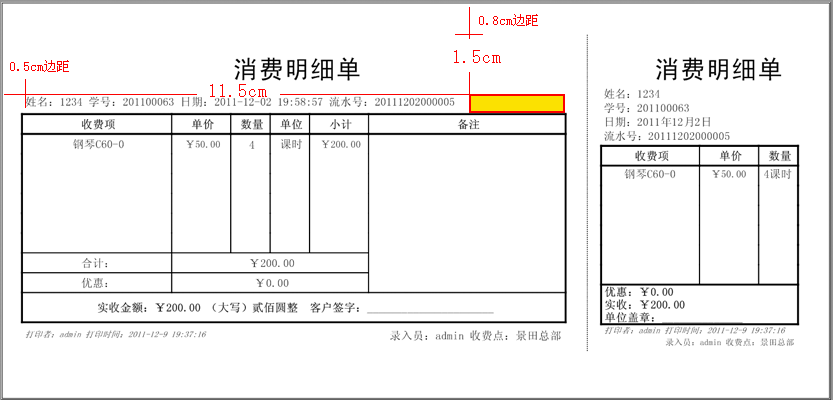
(效果图,黄色框内,即显示欠费的地方。除打印机边距,坐标大约是 x = 11.5cm,y = 1.5cm。 )
首先找到消费单的数据源代码:(在说明书的第四章 功能扩展-->二、如何修改打印报表?-->报表数据库(DataSet)-->消费单)
public static DataSet GetBill(long BillID)
{
using (OleDbConnection connection = new OleDbConnection(connectionString))
{
OleDbCommand Comm = new OleDbCommand();
OleDbDataAdapter da = new OleDbDataAdapter();
DataSet ds = new DataSet("ds");
Comm.Parameters.Add("@BillID", OleDbType.BigInt);
Comm.Parameters["@BillID"].Value = BillID;
da.SelectCommand = Comm;
Comm.Connection = connection;
Comm.CommandText = @"Select * from Bill where BillID = @BillID";
da.Fill(ds, "Bill");
Comm.CommandText = @"Select * from BillItem where BillID = @BillID";
da.Fill(ds, "BillItem");
Comm.CommandText = @"Select Student.* from Student,Bill where Student.StudentID = Bill.StudentID and Bill.BillID = @BillID";
da.Fill(ds, "Student");
Comm.CommandText = @"Select StuClass.* from StuClass,BillItem where StuClass.StuClassID and StuClass.BillItemID = BillItem.BillItemID and BillItem.BillID=@BillID";
da.Fill(ds, "StuClass");
Comm.CommandText = @"Select Class.* from StuClass,BillItem,Class where StuClass.StuClassID and StuClass.BillItemID = BillItem.BillItemID and StuClass.ClassID = Class.ClassID and BillItem.BillID=@BillID";
da.Fill(ds, "Class");
return ds;
}
}
上面这段代码就是消费单/退货单的DateSet数据集,我们可以看到分别从
Bill,BillItem,Student,StuClass,Class 五张数据表上调用数据,每张表的含义请查询数据库手册:
http://www.mtcnsoft.com/help/swt2_db/,前面讲到学员欠费是针对账户级的,所以重点查看Student表,我们打开数据库手册Student表:
Student 学员表
学员基础信息表。
|
字段 |
类型 |
说明 |
|
StudentID |
Int |
学员编号。 |
|
StudentName |
VarChar |
学员姓名。 |
|
PYSimple |
VarChar |
拼音简码。 |
|
Byname |
VarChar |
别名。 |
|
Appellation |
VarChar |
称呼。 |
|
Sex |
Int |
性别。(0女,1男) |
|
StudentType |
Int |
学员类型。(0学生,1上班族) |
|
Birthday |
DateTime |
出生日期。 |
|
SchoolID |
Int |
校区编号。 |
|
SchoolName |
VarChar |
校区名称。 |
|
Photo |
VarBinary |
相片。 |
|
ExistPhoto |
Boolean |
是否存在相片。 |
|
Password |
VarChar |
密码。 |
|
DateAndTime |
DateTime |
报名日期。 |
|
Tel |
VarChar |
电话。 |
|
MobileTel |
VarChar |
手机。 |
|
Email |
VarChar |
电子信箱。 |
|
HomeAddress |
VarChar |
家庭地址。 |
|
PostCode |
VarChar |
邮编。 |
|
School |
VarChar |
学校。 |
|
Grade |
VarChar |
年级。 |
|
Class |
VarChar |
班级。 |
|
Company |
VarChar |
单位。 |
|
Headship |
VarChar |
职务。 |
|
IDcard |
VarChar |
身份证号。 |
|
SignInID |
VarChar |
ID卡号。 |
|
LastClassName |
VarChar |
最后加入的班级。 |
|
StuClassCount |
Int |
选班数量。 |
|
ConsultantID |
Int |
所属咨询员编号。 |
|
ConsultantName |
VarChar |
所属咨询员姓名。 |
|
MediaID |
Int |
媒体编号。 |
|
MediaName |
VarChar |
媒体名称。 |
|
Remark |
VarChar |
备注。 |
|
UserID |
Int |
录入者编号。 |
|
TrueName |
VarChar |
录入者姓名。 |
|
BillCount |
Int |
消费单数量。 |
|
ConsumedMoney |
Currency |
消费金额。 |
|
CreditMoney |
Currency |
欠费金额。 |
|
AvailableMoney |
Currency |
可用金额。 |
从上面表,我们可以看到CreditMoney字段表示欠费金额。找准了字段,我们就可以通过xsl语句读出这个值了。实际上asp.net中DataSet就是一种存储在内存中的XML文件。我们用这条语法操作它:
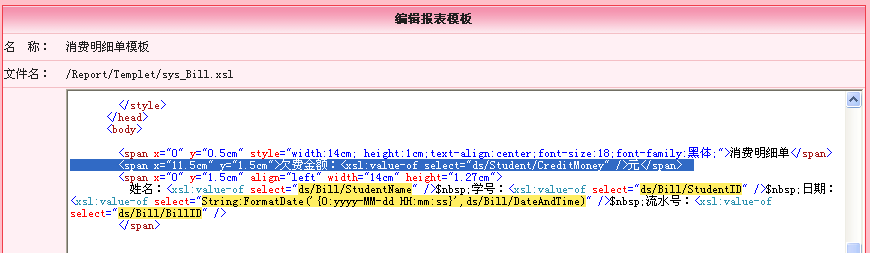
<xsl:value-of select="ds/Student/CreditMoney" />,下一步就是采用文本标签给欠费字段定位。
<span x="11.5cm" y="1.5cm">欠费金额:<xsl:value-of select="ds/Student/CreditMoney" />元</span> 最后,我们把这段代码加入到“消费明细单模板”(位置:分析-->打印模板-->消费明细单模板-->编辑),如下图:
这样消费单上显示欠费信息就实现了:) 向大家晒晒实际打印效果呵!!